Declarative UI for e-ink, in Rust.
Small, no_std, dependency-free. You write the screen; the framework handles layout, focus, input and the redraw.
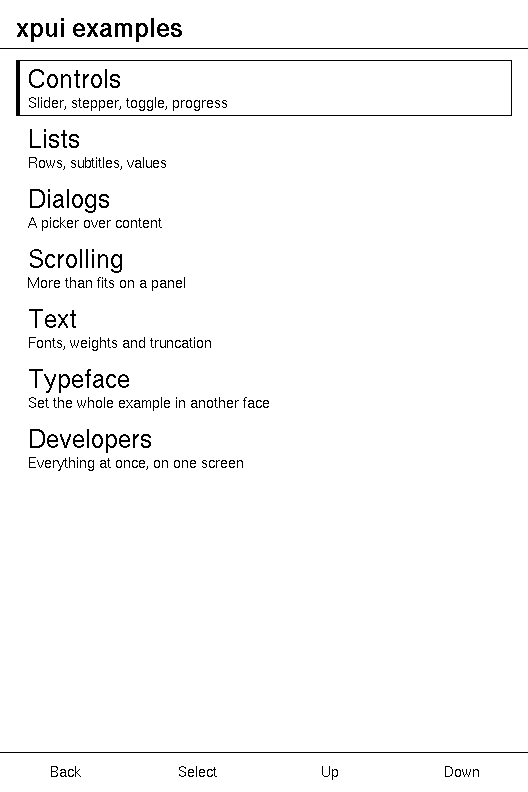
A screen
Describe it. xpui draws it.
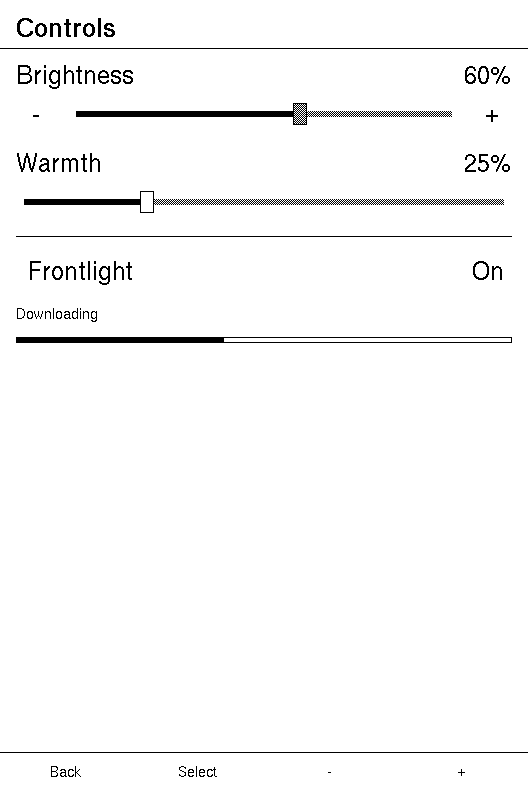
fn body(&self) -> impl View<Self::Message> {
    NavigationScreen::new(ScrollView::new(vstack![14;
        // A stepper is one focus stop but three touch targets: the two
        // glyphs nudge, the track sets an absolute value.
        // The name and the number are the control's, not the screen's. A
        // screen cannot draw the number: while an edit is open the
        // framework holds the value and does not tell the screen, so a
        // label built in `update` stands still while the track moves.
        Stepper::new(self.brightness)
            .on_change(ControlsMsg::Brightness)
            .on_step(ControlsMsg::BrightnessStep)
            .title("Brightness")
            .readout("%"),

        Slider::new(self.warmth, 100)
            .on_change(ControlsMsg::Warmth)
            .title("Warmth")
            .readout("%"),

        Divider::new(),

        Toggle::new("Frontlight", self.frontlight, "On", "Off")
            .on_change(ControlsMsg::Frontlight),

        Text::new("Downloading").font(Font::ui_small()),
        ProgressBar::percent(self.downloaded),
    ]))
    .title("Controls")
    .hints(
        Hint::Standard,
        Hint::Standard,
        Hint::text("-"),
        Hint::text("+"),
    )
}
Documentation
Start where you are.
Learn
Look up
Repositories
Every arrow points inward.
The framework
Building blocks
Tools
On a device
The gallery as firmware for the Xteink X3 and the Seeed Sticky — both images build; no panel driver yet